VxWorks 7 Beginner Guide: Step-by-Step RTOS Tutorial
VxWorks 7 is widely used in mission-critical embedded systems, but getting started can feel opaque if you’re coming from Linux or bare-metal development.
This guide provides a practical, developer-focused walkthrough of VxWorks 7—from environment setup to writing real-time tasks and understanding core RTOS concepts like scheduling and synchronization.
Unlike superficial tutorials, this guide emphasizes how things actually work under the hood, so you build transferable RTOS expertise.
🌍 What is VxWorks 7? #
VxWorks 7 is a deterministic real-time operating system designed for systems where timing correctness is as important as functional correctness.
Typical deployment domains include:
- Aerospace and avionics (flight control, satellites)
- Industrial automation and robotics
- Medical devices (life-critical systems)
- Defense and telecommunications infrastructure
Unlike general-purpose OSes, VxWorks guarantees:
- Bounded interrupt latency
- Preemptive priority-based scheduling
- Deterministic task execution
⚡ Key Capabilities of VxWorks 7 #
From a systems perspective, VxWorks 7 introduces several architectural improvements over earlier versions:
-
Modular Kernel (VxWorks 7 Platform)
Component-based system configuration using a layered architecture -
User/Kernel Space Separation (RTP Support)
Enables process isolation for improved safety -
SMP and Multicore Scheduling
Efficient scaling across modern CPUs -
POSIX Compliance
Easier portability of Linux/Unix applications -
Advanced Networking Stack
IPv4/IPv6, high-performance packet processing -
Security Features
Secure boot, access control, and system hardening
🛠️ Step 1: Install Wind River Workbench #
Wind River Workbench is the primary IDE for VxWorks development.
Installation Overview #
- Install VxWorks 7 SDK (includes toolchains and BSPs)
- Launch Workbench
- Select a workspace directory
What Gets Installed #
- Cross-compilers (GCC/LLVM-based toolchains)
- Board Support Packages (BSPs)
- Debugger and analysis tools
- VxWorks Simulator (VxSim)
🖥️ Step 2: Create a VxWorks Project #
VxWorks supports multiple project types. For beginners, start with a Downloadable Kernel Module (DKM).
Steps #
File → New → VxWorks Downloadable Kernel Module Project- Name:
HelloVxWorks - Select target architecture (e.g., x86, ARM64)
- Finish
Why DKM? #
- Runs in kernel space
- Fast iteration cycle
- Ideal for learning core APIs (taskLib, semLib, msgQ)
⚙️ Step 3: Configure the Target (Simulator) #
If hardware is unavailable, use VxSim.
Setup Flow #
- Open Target Manager
- Add target → VxSim
- Launch and connect
This creates a full RTOS runtime environment without physical hardware.
👋 Step 4: First Program – Task Creation #
In VxWorks, execution units are called tasks (not processes or threads in the traditional sense).
Hello World Example #
#include <stdio.h>
#include <taskLib.h>

void helloTask(void)
{
    printf("Hello VxWorks 7!\n");
}

void usrAppInit(void)
{
    taskSpawn("tHello",
              100,        /* priority (lower = higher priority) */
              0,          /* options */
              8192,       /* stack size */
              (FUNCPTR)helloTask,
              0,0,0,0,0,0,0,0,0,0);
}
Key Concepts #
taskSpawn()creates a new schedulable entity- Priority directly affects execution order
- Stack size must be explicitly defined
▶️ Step 5: Build, Load, and Execute #
Build #
- Right-click project → Build Project
Deploy #
- Connect to target (VxSim)
- Run as → VxWorks DKM
Expected Output #
Hello VxWorks 7!🔄 Step 6: Task Synchronization with Semaphores #
Concurrency is where RTOS systems become interesting—and complex.
Producer-Consumer Example #
#include <stdio.h>
#include <taskLib.h>
#include <semLib.h>

SEM_ID sem;

void producerTask(void)
{
    while (1)
    {
        printf("Producer: data ready\n");
        semGive(sem);
        taskDelay(100);
    }
}

void consumerTask(void)
{
    while (1)
    {
        semTake(sem, WAIT_FOREVER);
        printf("Consumer: processing data\n");
    }
}

void usrAppInit(void)
{
    sem = semBCreate(SEM_Q_FIFO, SEM_EMPTY);

    taskSpawn("tProducer", 90, 0, 8192, (FUNCPTR)producerTask, 0,0,0,0,0,0,0,0,0,0);
    taskSpawn("tConsumer", 100, 0, 8192, (FUNCPTR)consumerTask, 0,0,0,0,0,0,0,0,0,0);
}
What This Demonstrates #
- Binary semaphore synchronization
- Task coordination without busy-waiting
- Priority-driven execution behavior
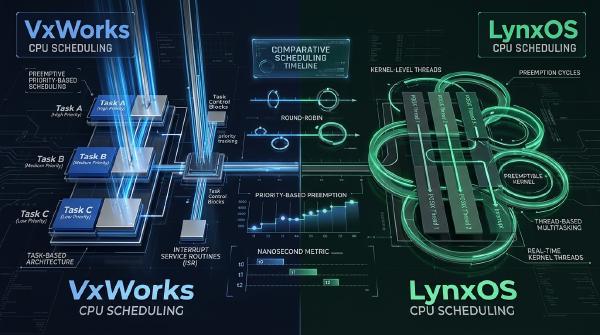
🧵 Understanding VxWorks Scheduling #
VxWorks uses preemptive priority-based scheduling:
- Lower number = higher priority
- Highest-priority READY task always runs
- No time slicing unless explicitly enabled
Implications #
- Starvation is possible if priorities are misconfigured
- Priority inversion must be handled (via priority inheritance)
🧠 Memory and Execution Models #
VxWorks supports two primary models:
Kernel Mode (DKM) #
- Fast, direct access
- No isolation
- Suitable for drivers and low-level components
User Mode (RTP – Real-Time Process) #
- Memory protection enabled
- Safer execution
- Preferred for large applications
🔍 Debugging and Analysis Tools #
Workbench provides powerful debugging capabilities:
Core Tools #
- Task-level debugger
- Stack trace inspection
- Breakpoints and watchpoints
Advanced Tools #
- System Viewer (trace scheduling events)
- Performance Profiler
- Memory analysis tools
Understanding timing issues often requires trace-based debugging, not just breakpoints.
🌐 Beyond Basics: Networking and IPC #
VxWorks provides rich IPC and networking primitives:
- Message queues (
msgQ) - Pipes and shared memory
- BSD sockets (POSIX networking)
These are essential for:
- Distributed embedded systems
- Real-time data pipelines
🏗️ From Tutorial to Production Systems #
Moving from examples to production requires:
- BSP customization
- Device driver integration
- System configuration (VSB/VPB projects)
- Deterministic performance tuning
You will also need to consider:
- Interrupt latency tuning
- Cache and MMU configuration
- Multicore scheduling policies
🎯 Conclusion #
VxWorks 7 is not just an RTOS—it is a full embedded platform designed for systems where failure is not an option.
Key takeaways:
- Tasks, priorities, and synchronization are the core primitives
- Determinism requires careful system design—not just API usage
- Tooling (Workbench, tracing) is essential for real-world debugging
- Scaling to production involves architecture decisions beyond code
Once you understand these fundamentals, transitioning to advanced topics—device drivers, networking stacks, and system optimization—becomes significantly easier.
VxWorks rewards engineers who think in terms of timing, concurrency, and system behavior, not just functionality.